How I find trending Google keywords
This is how I find what keywords people are searching for right now. I’ve broken my process down into 5 steps using just two tools.
The walkthrough and screenshots are from the original December 2024 article. Data interpretation checked October 2026; the example has not been rerun against today's searches.
Creating content around trending keywords is vital if you want to jump on trends before your competition.
|

Use the following process to look for topics your audience may want to know about. Search interest is a starting point for research, rather than proof of demand for a product.
Step 1: Choose your topic or niche
There are a lot of keywords out there so lets start with focusing on your niche or industry.
In this example I am going to find trending keywords in a niche I know nothing about “hair care”.
The first step is to visit trends.google.com and choose the most relevant category to your niche. In this case there is a category called “hair care”. Perfect. Find a category that is most relevant to your niche.
Important: Don’t enter a keyword after selecting a category. Leave it blank.
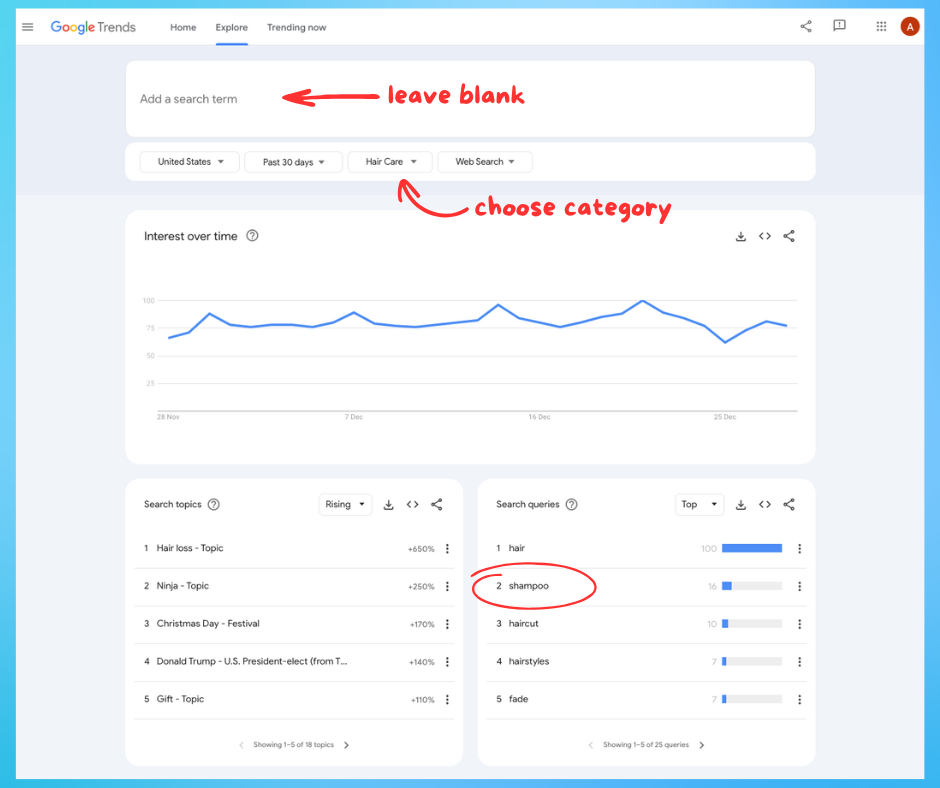
Historical screenshot from the December 2024 walkthrough; filters and results may differ today.
I’ve selected “United States” as my country of choice and also have selected the period of the “Past 30 days”. Some categories may not have enough data from the past 30 days so you may have to choose 90 days or more.
Step 2: Select a top keyword
Choose one of the top search queries in the “hair care” category.
I’m going to choose “shampoo” by clicking it and once again I select the “hair care” category. This will give me a list of keywords related to the topic of “shampoo” in the hair care category.
Step 3: Pick a trending keyword
Tip: 💡 If you’re looking for trending keywords for YouTube then I recommend you select “YouTube” from the drop down as this will give you keywords trending on YouTube.
I’m going to stick with “Web Search” which means searches on Google.com.
In the original example, “rice water shampoo” appeared as a rising query for the selected 30-day period. This sounds interesting, let's select it.
Google's Rising queries show searches with the strongest growth compared with the preceding period. The percentage shows that growth; Breakout means growth of more than 5,000%. A large percentage can come from a small starting point, so it does not establish a large market by itself.
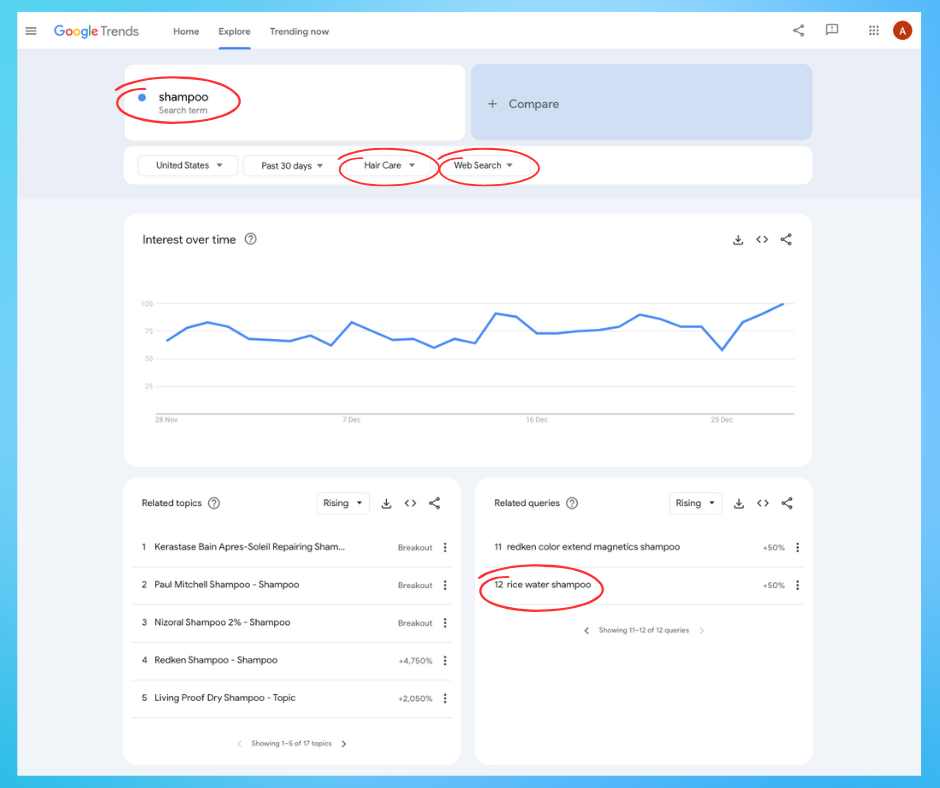
Historical related-query results from the December 2024 walkthrough.
Step 4: Double check the keyword is actually trending
It’s important to double check the data. In Google Trends I do this by entering my chosen keyword and then zooming out by changing the date period to 5 years. This helps put a recent rise in context: is it a repeated seasonal peak, a brief spike or a longer change in search interest?
In the original example, this view showed a spike in relative search interest for “rice water shampoo”. It does not show whether that query is growing today. Repeat the check using current dates and the location relevant to your audience.
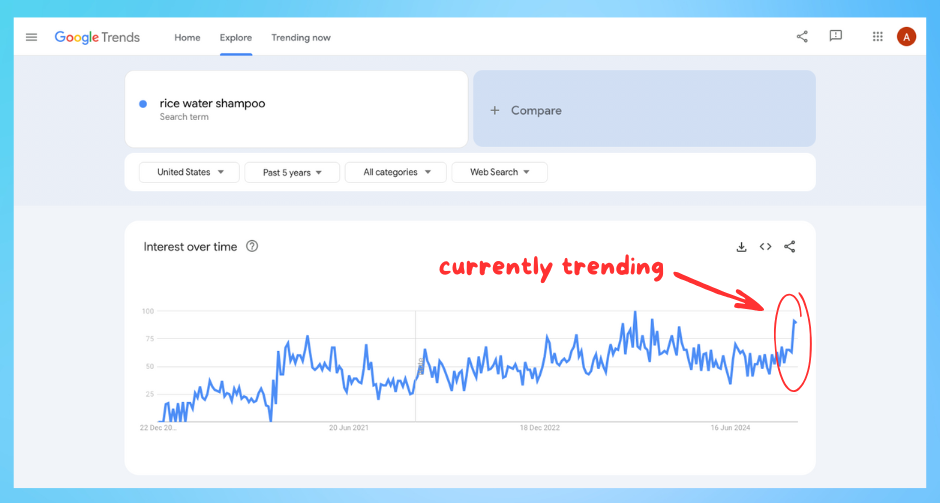
Historical five-year view from the December 2024 walkthrough. Google Trends Explore reports relative interest, not an exact search count.
Most people stop here but we need to go a step further to find those really hot trending keywords.
Step 5: Find related keyword ideas
Having found a rise in the original “rice water shampoo” example, I want to see what related questions people might have.
This is important as it makes creating content easier by giving me ideas of what I need to talk about.
Using Google autocomplete I can pick out related keyword ideas.
Autocomplete helps complete a search. Google says its suggestions can reflect factors including location, language, trending interest and past searches. A suggestion appearing does not prove that its search interest is growing. Use it to collect ideas, then check those ideas separately in Trends. See how Google autocomplete works.
I now have a list of related ideas to investigate, rather than a verified list of growing keywords.
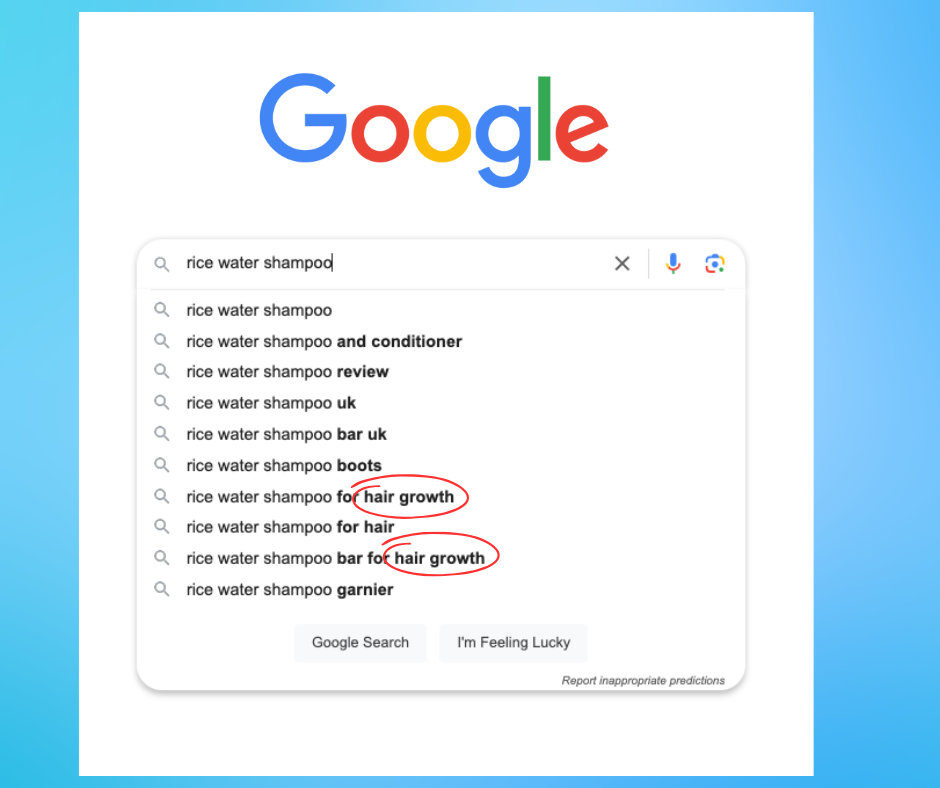
Historical autocomplete suggestions from the December 2024 walkthrough; suggestions vary by context and over time.
In this screenshot, “hair growth” is mentioned twice. That suggests a question worth researching, such as “What are people asking about rice water shampoo?” Search suggestions do not establish that a product causes hair growth. Any article about its effects would need suitable evidence, and a personal test should only be described if it actually happened.
We can now choose a relevant question to investigate, check current search interest and decide whether we have something useful and well-supported to add.
Advanced Tools
If you want to go even further down the trending keywords rabbit hole then here are 3 more tools which might help you.
Glimpse
Glimpse is a useful tool which helps you “supercharge” Google Trends via a Chrome extension. It adds data such as estimated search volume and related keyword suggestions. Third-party volume estimates are separate from Google's normalized Trends index; check the provider's current methodology, access terms and limits.
I’ve written a full review of Glimpse if you want to read my original experience with the tool.
Exploding Topics
Exploding Topics is useful for exploring broad topics, products or services as a starting point for keyword research. Check a topic against your audience and current search data before turning it into a content idea.
I’ve written a full review of Exploding Topics based on my original use of the tool. Check the provider's current access and trial terms before signing up.
Keywords Everywhere
Keywords Everywhere is another Chrome extension. It can add keyword metrics to a research workflow, but compare the provider's data dates and methodology before using those figures alongside Trends.
I find the volume estimates and related keyword ideas useful for research. They should not be treated as exact Google Trends search counts or as proof that a suggestion is trending.
Related guides
- Google Trends keyword research explains Top and Rising queries in more detail.
- How to use Google Trends covers interpreting the relative-interest graph and the difference between Explore and Trending now.
Getting your content seen these days is hard. With so much compeition for attention it's vital that you create content about what people are looking for now. Being the first to create content around a trend can give you the upper hand against your competition.
Your marketing friend,