How to use Google Trends
What is Google trends (in simple terms)
A free to use website where you can see the popularity of google searches over time.
Original walkthrough and screenshots from January 2024. Export, alerts and API information checked October 2026.
 Rating:
Why you should care
Google trends shows you if more or less people are searching for something over time. It’s a fantastic tool for creators, business owners and marketers. Or anyone curious on what the world is searching for.
|

What you can use it for
Here are a few use cases for Google trends.
- Find products that are growing in popularity.
- Get new business ideas.
- Discover industry trends.
- Get content ideas for a youtube video.
- Conduct free keyword research for a blog post.
One thing it doesn’t do
The Explore graph doesn’t tell you the exact number of searches. Its values show relative search interest, not absolute search counts. The separate Trending now view provides bucketed traffic figures for trending searches.
How to use Google trends (the basics)
- Visit trends.google.com
- Enter a search term into the search bar
- Choose a country
- Select a time range (I use 5 years or 12 months)
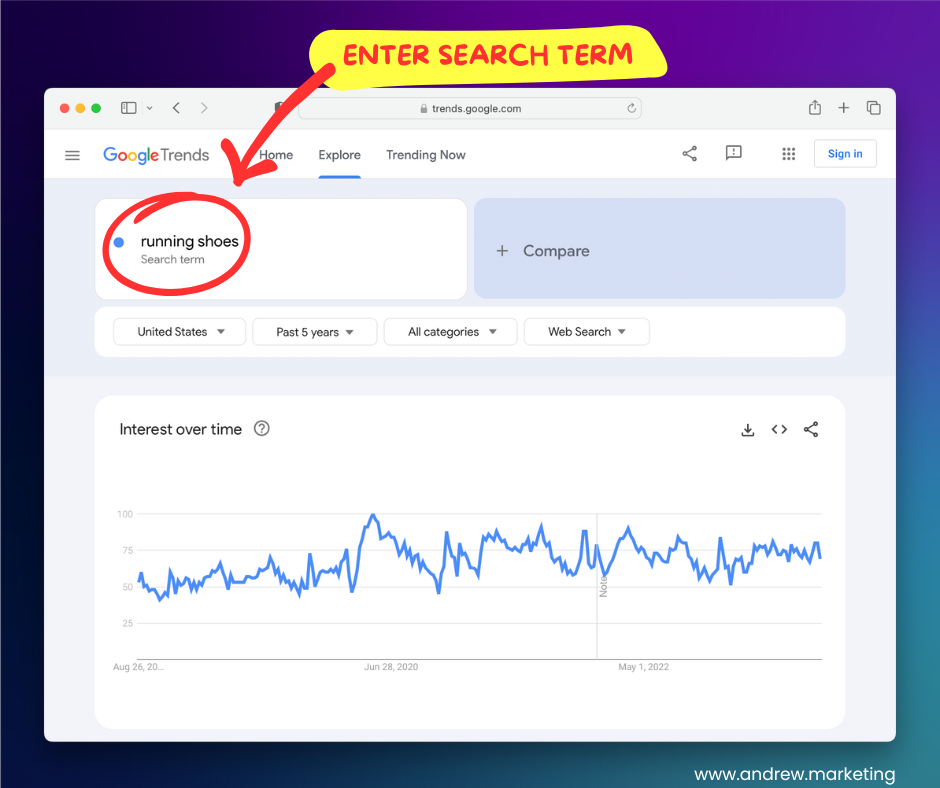
In the example above I entered “running shoes” into the search box.
I then selected “United States” and the period “past 5 years” from underneath the search box. You can choose the country and time period most relevant to you.
Once entered, Google trends will show you a graph for your chosen search term.
The Google trends graph explained
The Google Trends Explore graph shows how relative search interest in a term changes over time.
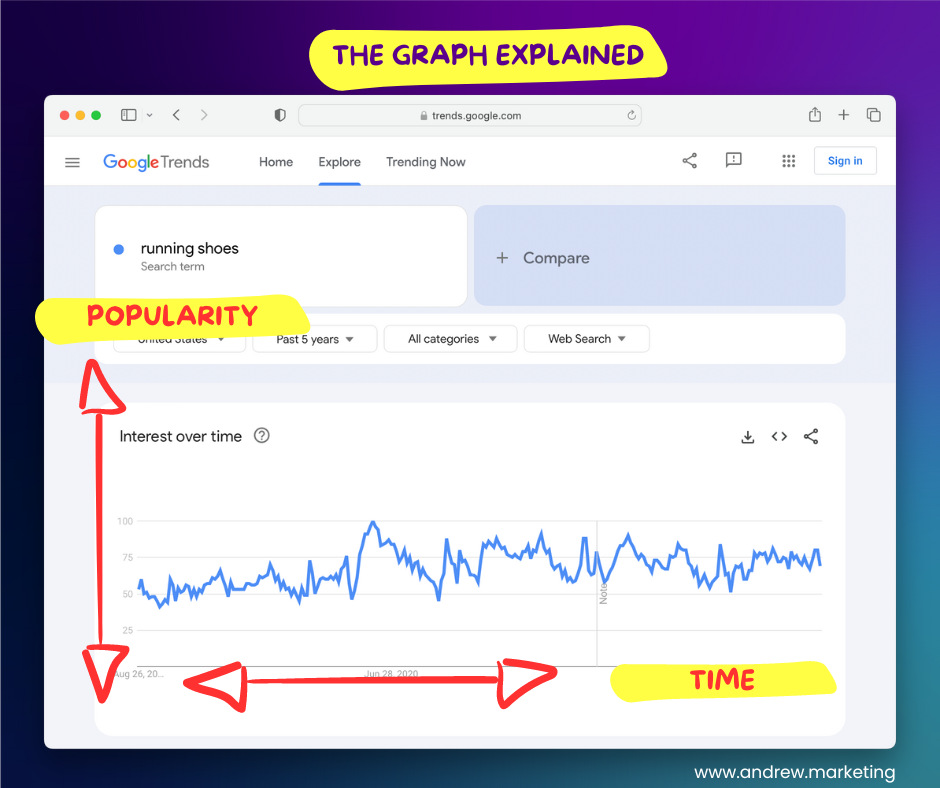
The higher the line, the greater the term's share of searches relative to its peak in the selected comparison. A rising line does not by itself prove an increase in the absolute number of searches.
Along the bottom of the graph (horizontal axis) is the time period. If you hover over any part of the line you can see the search interest value for a specific date.
In the “running shoes” example we can see how relative search interest changes over time.
Some questions we could ask ourselves:
- Is relative search interest in “running shoes” higher at the end of this example than five years earlier?
- When were searches for “running shoes” at their peak?
- Do people search for “running shoes” all year round?
What do the numbers mean?
A question I always get asked is what do the numbers mean and why are they out of 100?
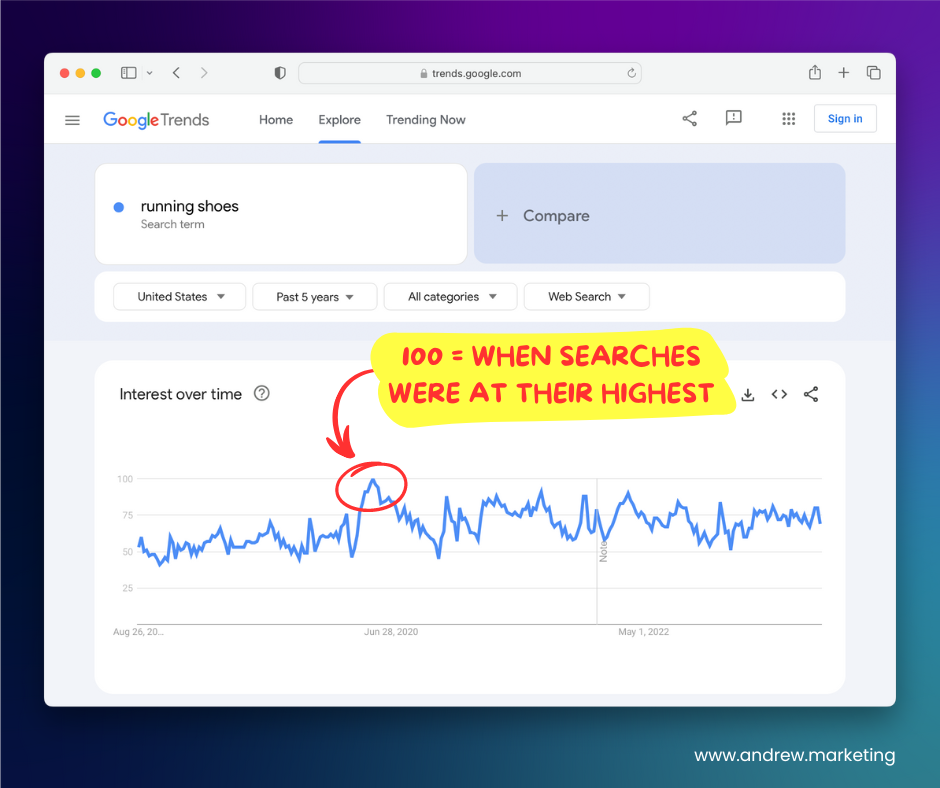
The 0–100 values are a relative index. Google divides each data point by total searches in the geography and time it represents, then scales the results relative to the peak interest in the selected comparison. See Google's explanation of normalized Trends data.
It’s important to know that the numbers are not search volumes or how many people search for something in their thousands. Instead it’s a normalized scale from 100 to 0.
| Number | Meaning |
|---|---|
| 100 | Peak relative search interest in the selected comparison. |
| 50 | Half the relative search interest of the peak; not necessarily half as many searches. |
| 0 | Insufficient search data to report a value; it does not prove there were no searches. |
What is “interest over time”?
In simple terms, we can think of “interest over time” as the popularity of something over time.
The Google Trends Explore graph shows whether your chosen keyword makes up a larger or smaller share of searches over time. It measures search interest, rather than counting people or proving demand for a product.
How to read the data
Let’s go back to our “running shoes” example.
This is how I would interpret the data.
- Relative search interest in running shoes is higher at the end of this historical example than five years earlier.
- Relative interest in “running shoes” peaks in May/June 2020 in this example.
- People generally search for “running shoes” all year round.
Compare multiple search terms
Comparing multiple search terms is something I do regularly. It’s a quick and easy way to compare search interest for two or more things. You can compare up to 5 search terms.
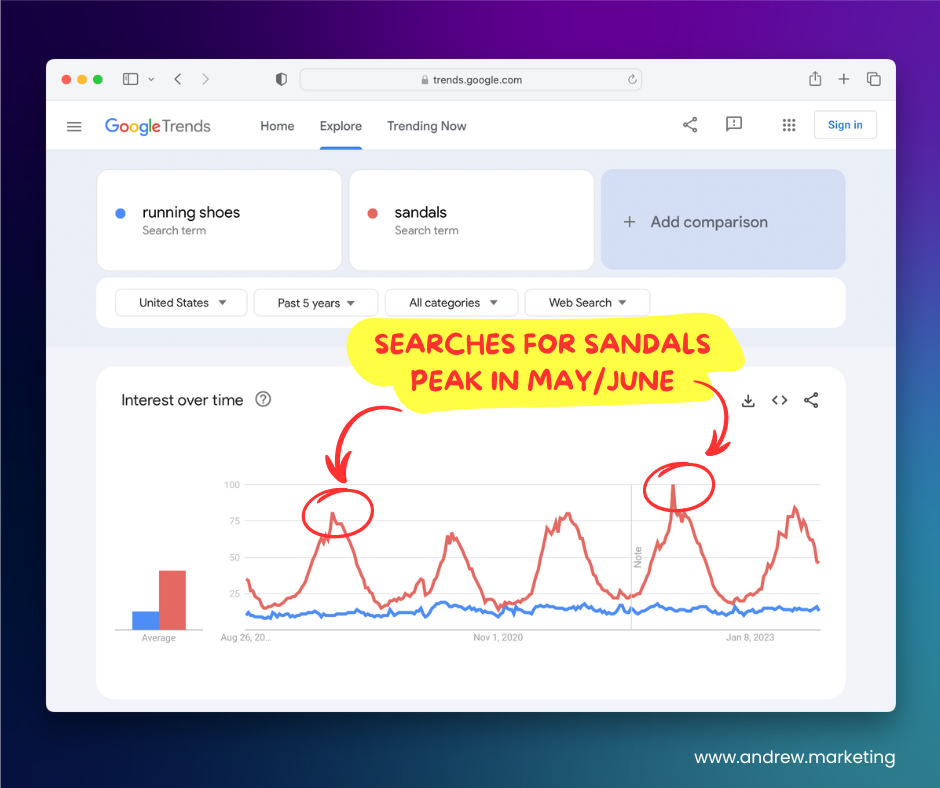
In the screenshot above I am comparing search interest for “running shoes” and “sandals”. Two different types of footwear.
I can quickly deduct a couple of things.
- Sandals have higher relative search interest than running shoes in this example.
- Sandals have a very seasonal demand with most people searching for them in May and June every year.
Understanding seasonal demand is extremely useful for any retailers or ecommerce companies.
What’s the difference between topics and queries? (intermediate)
There is more to google trends than the graph. The topic and queries panel at the bottom of the page are really useful.
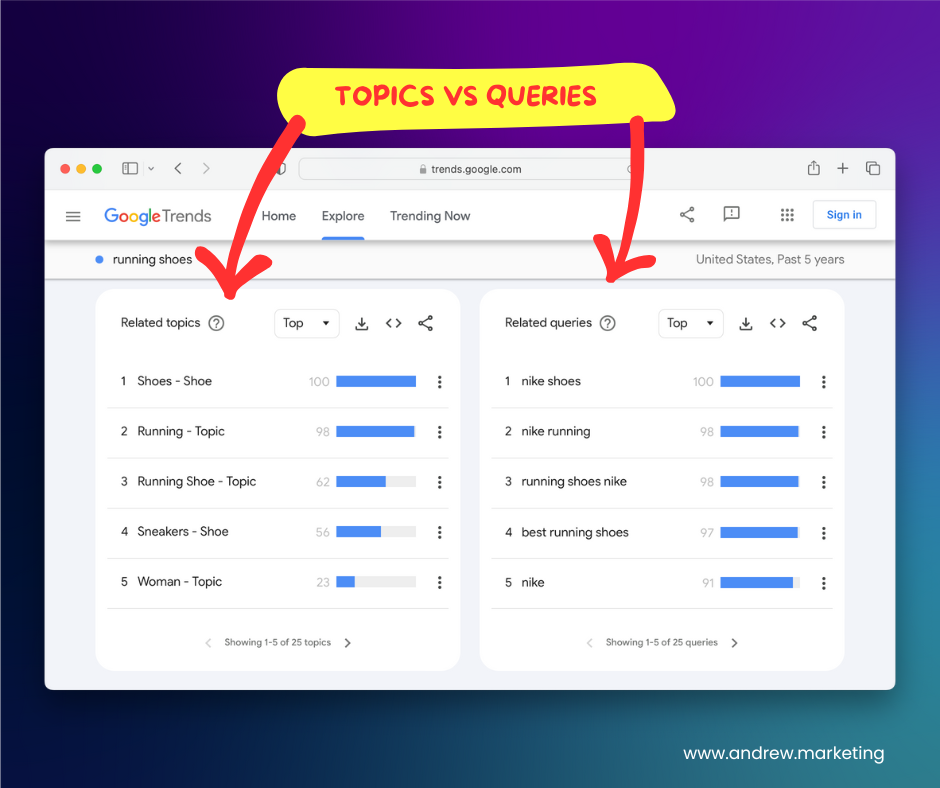
Topics = broad categories
In the bottom left corner of the Google trends page you’ll see a list of related topics. These are broad topics which Google thinks are related to your search term.
By clicking on a topic you can then see its trend graph and also explore the top related search queries.
This can be a great starting point for market research.
Related Queries = specific search terms
On the bottom right corner you will see a list of queries. These are specific keywords which people search for on Google.
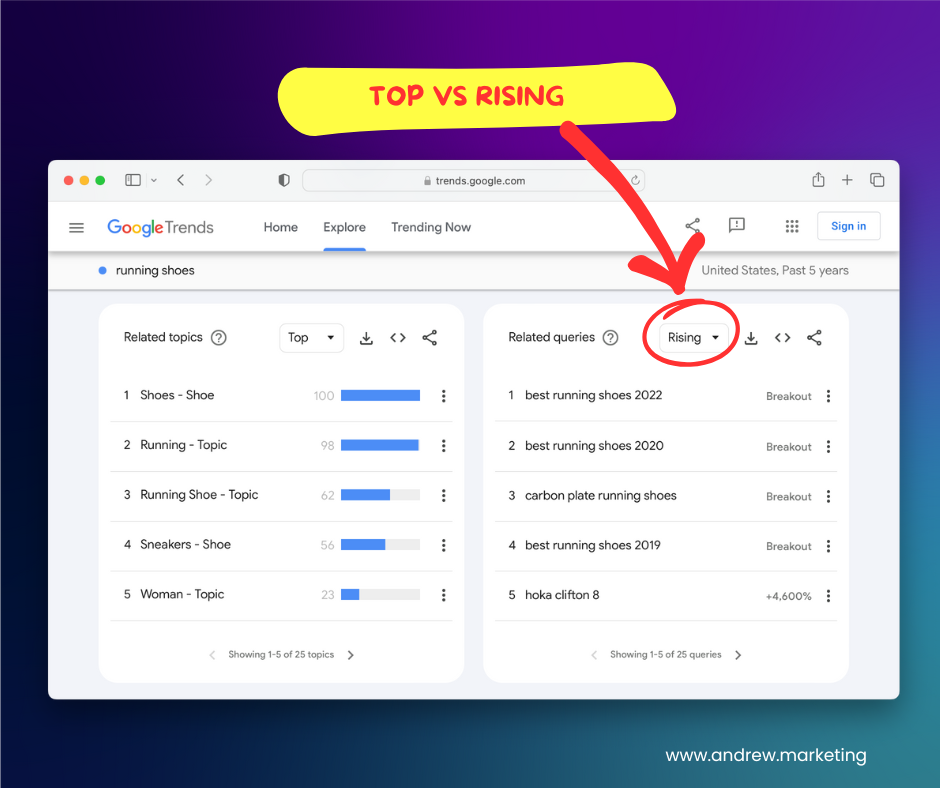
You can switch between top and rising by selecting the dropdown in the top right hand corner of the panel.
Top Queries
The top queries are the most popular keywords related to your search term. These keywords get the most searches. You can click on any of these to see their trend graph.
This is amazing data to have. Using our running shoes example we can see that Nike is one of the most popular related search terms. That makes sense.
This is essentially a free keyword research tool.
Rising Queries
If you switch to the rising keywords then you can see what keywords are gaining popularity over your chosen time period. This is a great way to see new things people are searching for.
Quick Tip 💡
To get queries which are trending right now, try using shorter time periods such as past 90 days and past 30 days.
4 expert tricks (advanced)
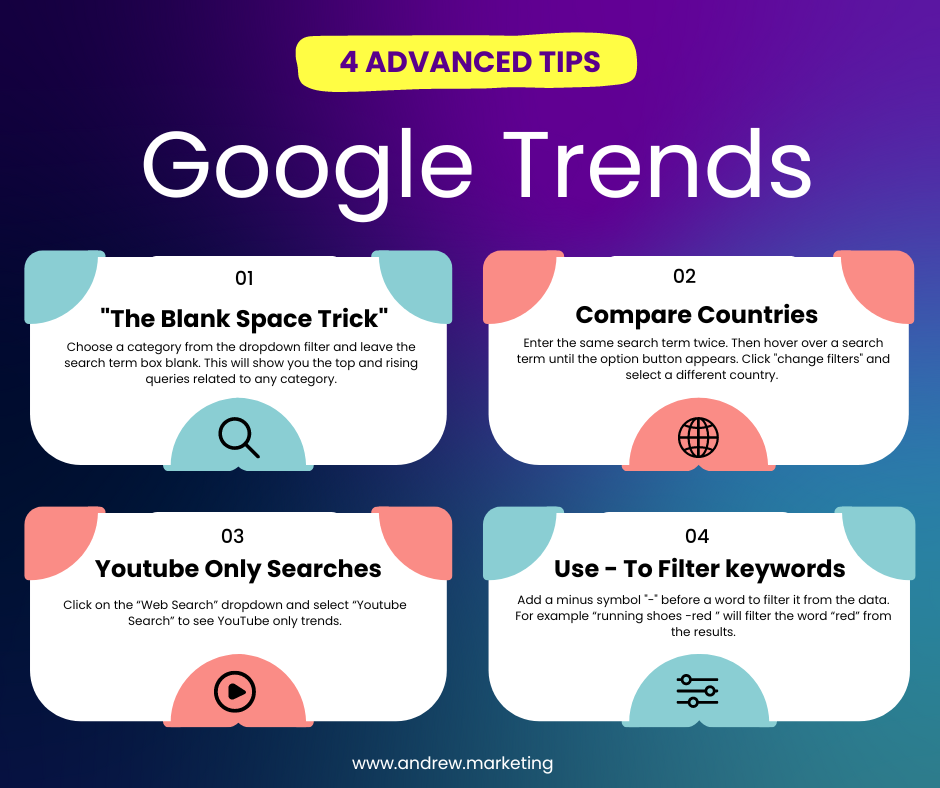
If you’ve skipped straight to this bit I don’t blame you. I rarely see people talk about these tricks. I’ve learned all of these by trial and error.
- The blank space trick
- Choose a category from the dropdown filter and leave the search term box blank. This will show you the top and rising queries related to any category.
- Compare countries side by side
- Enter the same search term twice. Then hover over a search term until the option button appears. Click “change filters” and select a different country.
- Youtube only searches
- Click on the “Web Search” dropdown and select “Youtube Search” to see YouTube only trends.
- Use “-” to filter keywords
- Add a minus symbol “-” before a word to filter it from the data. For example “running shoes -red ” will filter the word “red” from the results.
Google Trends Alternatives
There are a number of tools like Google Trends. Exploding Topics is considered to be the most similar as it also provides trending topics. Below is my personal choice for Google Trends alternatives.
- Exploding Topics
I’m a fan of Exploding Topics, especially their free newsletter. The platform curates trending topics in over 20 categories. Unlike Google Trends where you have to search for trending topics, Exploding Topics tells you what’s trending . If you want more information read my full review of Exploding Topics.
https://www.explodingtopics.com
- Pinterest Trends
Pinterest trends is an underrated tool. It is very similar to Google Trends but is based on Pinterest search instead of Google data. Pinterest is estimated to have over 1 billion monthly visitors, while it might not be as much as Google it’s still a great source of data. It’s especially useful for anyone selling physical goods as Pinterest users are often looking for product inspiration.
- Glimpse
Glimpse is a relatively new tool and offers a fantastic chrome extension that superchargers Google Trends. The tool adds search volume and related keywords to Google Trends. If you are a regular Google Trends user but looking for more data I definitely recommend trying it. Similar to Exploding Topics the website also has a great free newsletter.
- Keywords Everywhere
Keywords everywhere is another google chrome extension. I often use the tool for keyword research but it also shows trend data. After installing the extension you can see detailed keyword data on every google search you do. It’s one of the cheapest ways to conduct keyword research.
https://keywordseverywhere.com/
- Google Keyword Planner
If you have a Google Adwords account I recommend making use of the keyword planner tool. It’s a really powerful tool that can show you trending keywords related to your website. It can also give you keyword ideas and has detailed trend data such as monthly trends and year over year changes. The data can be sorted by increases in searches so it is easy to pick our trending keywords. You can create a google adwords account for free even if you don’t plan on running Google ads.
Frequently Asked Questions
Is google trends free?
Yes, Google trends is free for anyone to use. You don’t need a google account and there are no logins required. The website can be accessed here: trends.google.com.
How do I download data?
You can download a chart as a CSV file using its download icon, then open that file in Excel or Google Sheets.
How much does google trends cost?
Nothing, there is no pricing because Google trends is absolutely free. Enjoy!
Does google trends include youtube searches?
By default Google trends shows web searches and not youtube searches. However you can easily get trends for youtube searches by selecting “youtube searches” in the fourth dropdown.
Can you get google alerts for google trends?
The old Google Trends email-subscription page is no longer the way to set up keyword alerts. For current trending searches, open Trending now, choose a location and use Export → RSS feed to follow the feed in an RSS reader. This follows trending searches for that view; it does not recreate email alerts for arbitrary keywords. Google's Trending now guide explains the filters and export options.
Is there a google trends newsletter?
Check the Google Trends homepage for currently available newsletter options. Newsletter availability and frequency can change; a general newsletter is different from an alert for a keyword you choose.
Does Google trends have an official API?
Google now offers an official Google Trends API alpha. Access is limited to approved testers, so it is not an API everyone can immediately use. Check Google's page for current availability before planning an integration.