How to find trends with Glimpse (Google Trends Extension) A full review
Meet Glimpse, the chrome extension that gives you super powers when it comes to finding trending topics and keywords online.
The add-on for Chrome browsers makes Google Trends even more useful.
This review and its screenshots describe my January 2025 experience. Links and pricing wording were reviewed in October 2026; the product has not been retested.
 Rating:
|

You can find the extension and current access options on the Glimpse website.
Once installed, just visit trends.google.com and you’ll be greeted with a “super charged” Google Trends.
I’m a huge fan of Google Trends and the Glimpse team have done a great job of making the tool even more powerful.
How does Glimpse improve Google Trends?
Here is a list of how Glimpse makes Google Trends better.
- See search volume data.
- Track keywords and get change alerts.
- View the seasonality of keywords.
- See hundreds of related keywords.
- Find keyword trends in categories which don’t exist in Google Trends (e.g. Cryptocurrency, Skincare, Diets, Retail, Home Decor, Sustainability, Wealth Management)
The screenshot below shows the keyword lookup page.
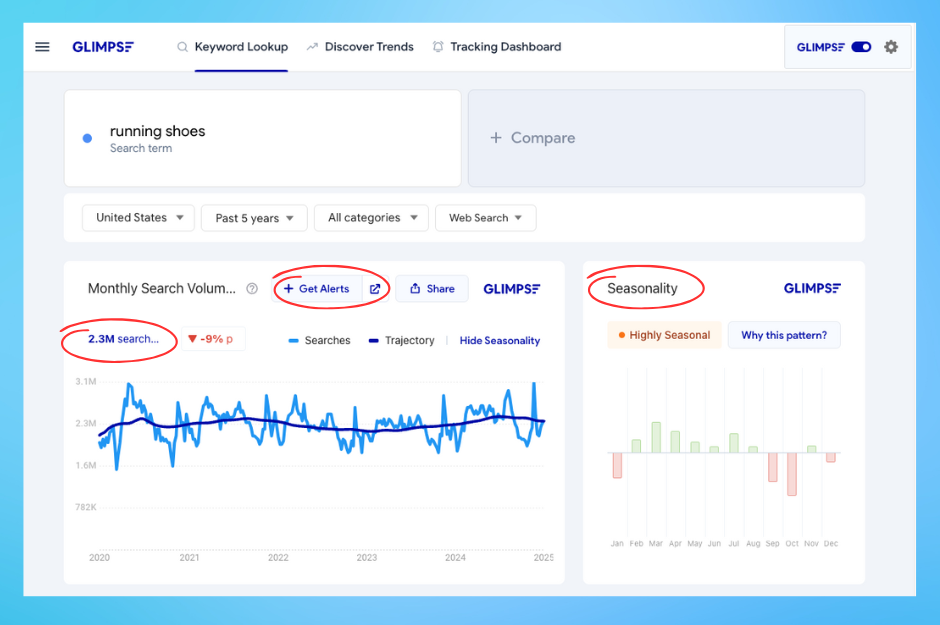
If you’ve used Google Trends this will look familiar but with Glimpse installed you get access to extra data such as search volume, trend trajectory and seasonality.
The addition of search volume to Google Trends is probably the single most powerful feature.
Glimpse displays search-volume figures alongside Google Trends’ relative-interest index. Treat these third-party figures as estimates for comparing demand, rather than exact counts or a direct measure of market size.
My 3 Favorite Features
Discover trending keywords
(that you won’t find in Google Trends)
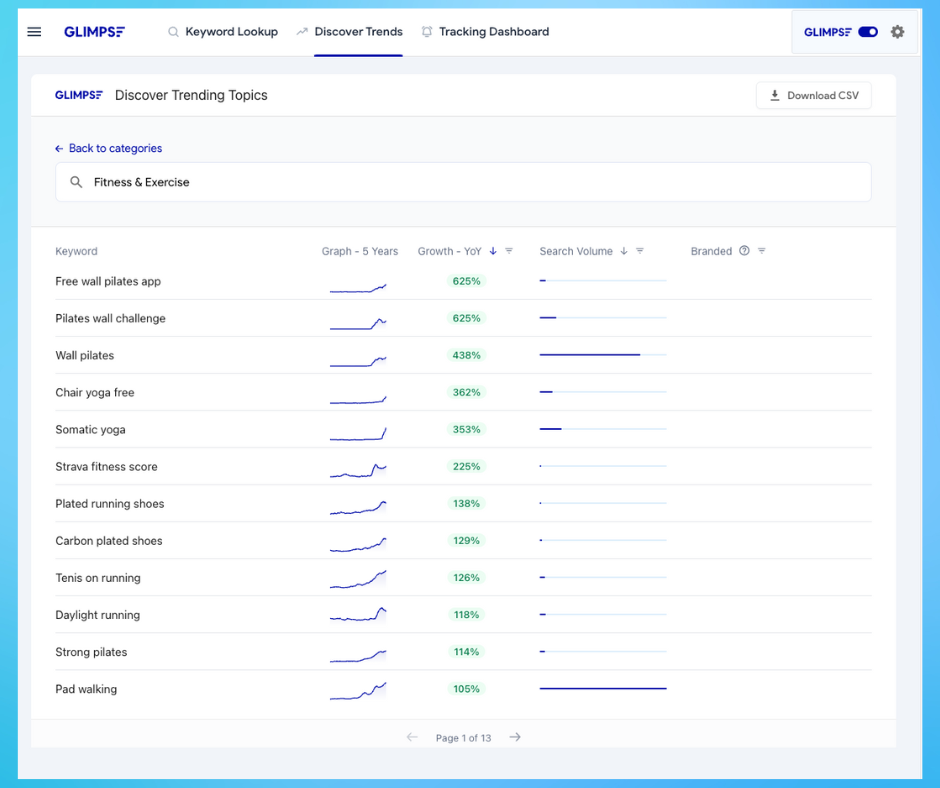
This is a key feature of Glimpse and one of my personal favorites. The ability to quickly discover trending keywords for a range of categories.
In this screenshot from my January 2025 review, I sorted the Fitness & Exercise category by highest year-on-year growth. It shows how I found ideas at the time; rerun the search before using those topics in a new campaign.
This is really powerful data and shows keywords you wouldn't discover in Google Trends.
I also like the 5 year graph and search volume bar in this view.
People Also Search Keywords
Glimpse has lots of keyword data related to any search query. The amount of keyword data is much more than Google Trends offers.
In my original test, the related-keyword list helped me dig into a topic by clicking individual terms and inspecting their trends. The number of results available will depend on the query and your current plan.
Quick Tip 💡 Sort this view by “Growth” and you get recently trending keywords.
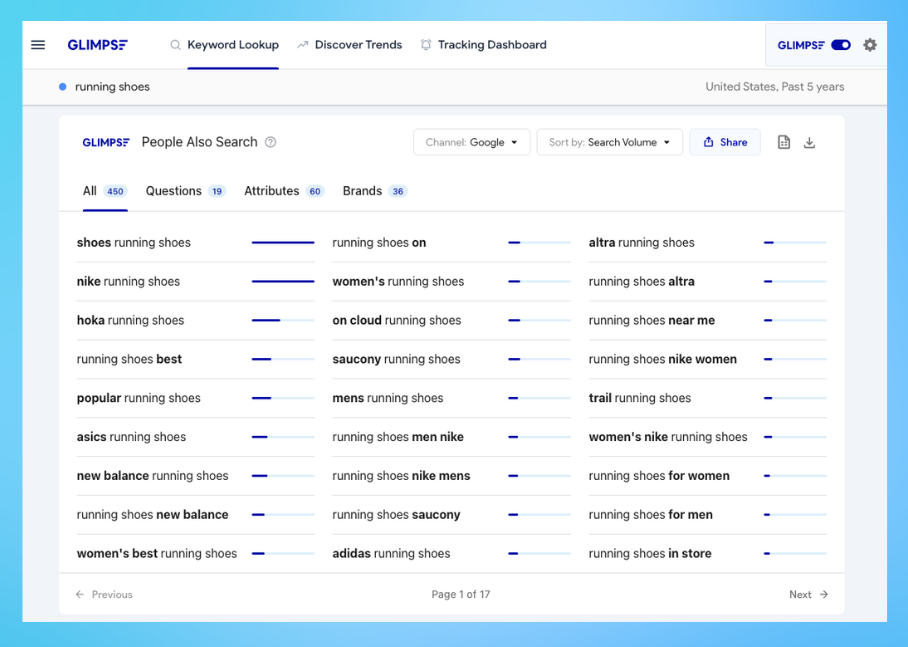
There are even more keywords on the questions, attributes and brands views.
Track Keyword Trends
Glimpse offers keyword alerts, which are useful if you want notifications about topics you follow. Google Trends still lets you inspect search-interest charts; its Trending now page also supports RSS exports. That feed is different from an alert for an arbitrary keyword.
You can easily track any keyword from the "keyword lookup" page.
Two features I wanted in my original test
These were requests from January 2025, rather than a checklist of features missing from today’s product.
Track categories not just keywords
As well as tracking keywords I would like the ability to track a whole category. For example if I’m a skincare brand I would like to track the “Skincare” category and get alerted to new or trending keywords within the category.
Filter the trends page by location
The “discover trends” page is really powerful and it would be useful for those of us outside the US to be able to filter the trending keyword list by location.
Bonus Features
While I’ve highlighted my favorites there are a couple of additional features that are worth mentioning.
These aren’t worth the subscription alone but definitely add some value.
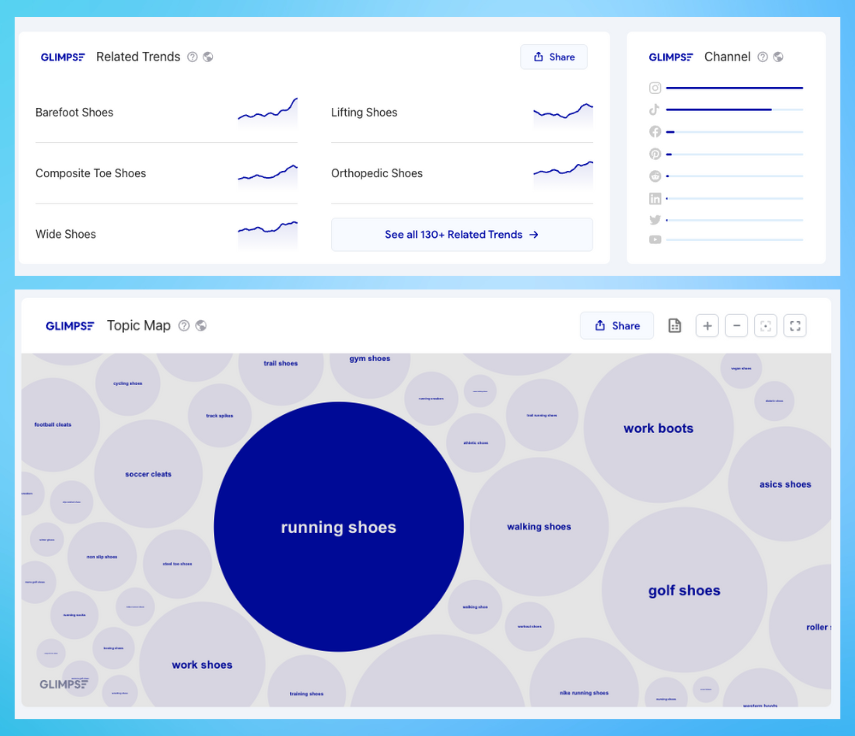
Topic Map
The topic map gives a quick overview of related topics. It’s a really nice visual to quickly see adjacent topics. The bubble layout does a good job of helping you quickly understand the popularity of related topics.
Channel Information
The channel information is a small feature which might prove useful to those wanting to get a steer on what channels to focus on. It does a good job of showing which platform a topic is most talked about on.
How does it compare to other tools?
As a marketer it’s tricky to position Glimpse against other tools as it sits alone in terms of features.
The closest alternative is Exploding Topics, however there are differences between the two.
Glimpse is unique in that it is a chrome extension. I like this as it makes using the tool super easy. Once installed it’s always just there when I visit Google Trends.
Compared to Exploding Topics, I like that I can dig deeper into trends with Glimpse by clicking on keywords. The extra keyword data really separates Glimpse vs Exploding Topics.
I think for some content creators who are niche specific Glimpse would work as a “lite” SEO tool. It certainly has enough data to give you content ideas but you wouldn’t use it to map out your SEO strategy.
Glimpse Pricing Plans
Check the Glimpse website for current access options, then review the plan details before subscribing. Compare the lookup allowance, tracked-keyword limit and billing commitment with the amount of research you expect to do.
The prices and quotas from my January 2025 test are no longer listed here as current offers. My original rating reflects that experience, rather than a new comparison of today's plans.
Summary
As a marketer, Glimpse is a “nice to have” addition to your tool box.
For professional marketers it isn’t going to replace any SEO tools such as Ahrefs or Semrush but it isn’t designed to do that.
For anyone who needs to keep up-to-date with trending keywords and topics in their industry or niche then I can see Glimpse being an important tool.
It's safe to say that after using Glimpse for a few weeks I would struggle to go back to plain old Google Trends!
Related guides
- My Google Trends review explains the underlying tool and its relative-interest data.
- How to research keywords with Google Trends walks through choosing a topic and checking related queries.
- My Exploding Topics review covers another approach to discovering topics.